Understanding Your Netbright Invoice
Every month, Netbright will email a Tax Invoice summarising your service charges. This guide walks through each part of the invoice using a sample bill, so you know exactly what you're looking at and where to find the details that matter most.
Just need to pay your bill?
Skip to How to Pay below, or use the View and pay online now link on your invoice to pay instantly by card.
A sample invoice
Here's an example invoice for a customer on our Home Pro plan, with the key sections labelled:
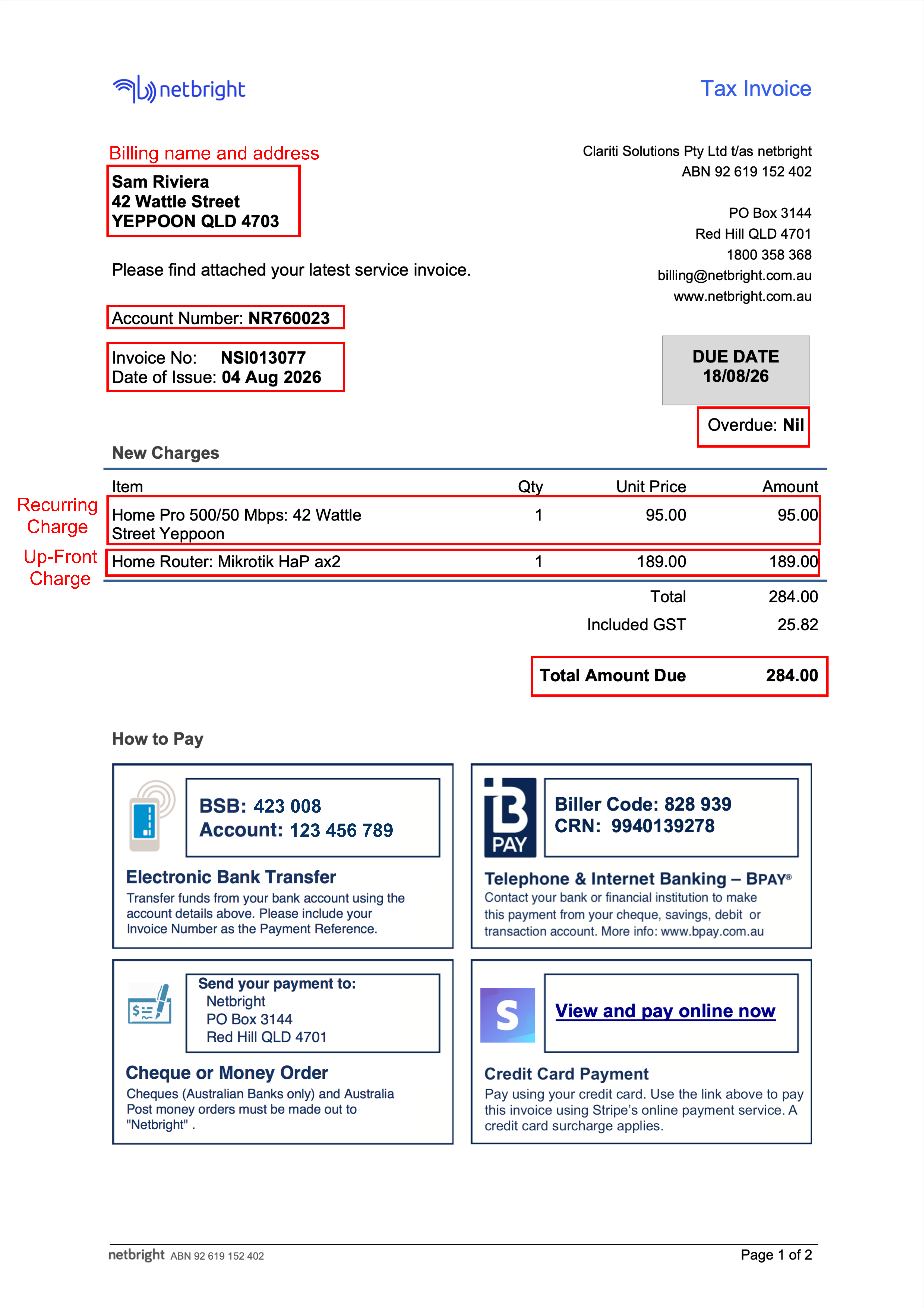
| Field | Example value | What it means |
|---|---|---|
| Billing name and address | Sam Riviera, 42 Wattle Street, Yeppoon QLD 4703 | Your name and billing address |
| Account Number | NR760023 | Your Netbright customer account ID — quote this for any account enquiry |
| Invoice No. | NSI013077 | A unique ID for this invoice — quote this if you're querying a specific bill or charge |
| Date of Issue | 04 Aug 2026 | The date the invoice was generated |
| Due Date | 18/08/26 | The date payment is required by |
| Overdue | Nil | Any unpaid amount carried over from previous invoices |
| Total Amount Due | $284.00 | The full amount payable by the due date |
Reading each section
Your details and the biller's details
The top of the invoice is split in two:
- Left side — your billing name and address. This is who and where the invoice is addressed to. If this is wrong (for example, you've moved house), contact support so it can be updated for future invoices.
- Right side — our details. This shows our ABN, postal address, phone number and website. You'll need the ABN if you're claiming this invoice as a business expense.
Account Number vs. Invoice Number
These two numbers are easy to mix up, but they mean different things:
- Account Number stays the same across every invoice you ever receive — it identifies you as a customer.
- Invoice Number is different on every single bill — it identifies this specific invoice.
When contacting support, having both numbers ready speeds things up. Use the Account Number for general account questions, and the Invoice Number when asking about a specific charge or payment.
Due Date and Overdue
- Due Date is the date your payment needs to be received by. Paying on or before this date avoids any late fees or service interruption.
- Overdue shows any amount still unpaid from previous invoices, separate from the current charges. If this shows
Nil, your account is fully up to date except for the current invoice.
Charges: recurring vs. up-front
The charges table is the heart of the invoice, and it's useful to understand the two types of line items you might see:
Recurring charges are charges that repeat every billing period for as long as you keep the service — for example, your monthly internet plan fee (e.g. Home Pro 500/50 Mbps). Expect to see this same line item, at the same price, on every regular invoice.
Up-front charges are one-off charges that appear only on the invoice where they were incurred — for example, a router purchase, an installation fee, or a one-time adjustment. These won't appear again on your next invoice unless you purchase something else one-off.
If your invoice total looks higher than usual, this is the first place to check — an up-front charge added to your usual recurring charge is the most common reason.
GST
The Included GST line tells you how much of your Total is GST (in Australia, this is calculated per the applicable GST rate.
Total Amount Due
This is the bottom-line figure you need to pay by the due date. It equals the current period's New Charges total, plus any Overdue balance from previous invoices.
How to Pay
Your invoice typically offers several payment methods, all listed on the invoice itself:
- Electronic bank transfer — using the BSB and account number shown, with your Invoice Number as the payment reference so it's matched to your account correctly.
- BPAY — using the Biller Code and your unique CRN (Customer Reference Number), through your own bank's telephone or internet banking.
- Cheque or money order — made out to the biller's name and posted to the address shown.
- Credit card (online) — via the "View and pay online now" link, processed by a third-party payment provider. Note that a card surcharge may apply.
Whichever method you use, always include the correct reference (Invoice Number for bank transfer, CRN for BPAY). Without it, your payment can be delayed in being matched to your account, even though the funds have left your account.
Frequently asked questions
Why is my invoice amount higher this month? Check the New Charges table for any up-front (one-off) items in addition to your usual recurring plan charge — new equipment, installation, or a plan change are the most common causes.
What if I already paid and the invoice still shows an amount due? Payments can take a business day or two to be matched to your account, especially by cheque or bank transfer. If it's been longer than that, contact support with your Invoice Number and payment date.
What does "Overdue: Nil" mean? It means you have no outstanding balance from earlier invoices — the only amount you owe is the current invoice's Total Amount Due.
Where do I find my Account Number or Invoice Number if I need to call support? Both are printed near the top-left of every invoice, just below your billing address.
Need more help?
If anything on your invoice doesn't look right, contact support with your Account Number and Invoice Number handy — this lets our team pull up your exact billing history.