Setting up your Fritzbox 7530 router
How to connect your Home Internet service to a Fritzbox 7530 router. This guide will walk you through the steps to set up your router and get your internet connection up and running.
Unpacking your Fritzbox 7530 router
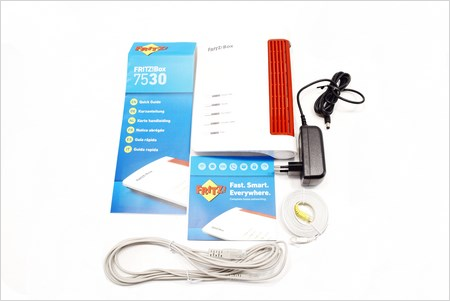
When you receive your Fritzbox 7530 router, it will come in a box with the following items as shown above.
- Fritzbox 7530 router
- Power adapter
- DSL cable
- Ethernet cable
- Quick start guide
Connecting your router to the Internet
To connect your router to the Internet, use the DSL cable to connect the port marked DSL on the Fritzbox to the telephone socket in your premise.
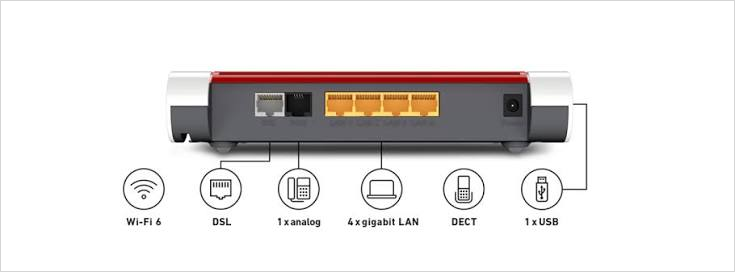
Power on your Fritzbox 7530 router.
Configuring your Fritzbox 7530 router
The Fritzbox 7530 is configured through a web browser - follow the steps below to configure it.
On your mobile device or computer, connect to the WiFi network printed on the label on the underside of the router (it will look like FRITZ!Box 7530 XXXX), using the WiFi key shown on the same label.
Open a web browser and go to http://fritz.box or http://192.168.178.1. When prompted, enter the password shown on the router's label on the underside of the router.
The setup wizard should launch automatically the first time you connect. If the wizard isn't shown, click Wizards and then Configure the Internet Connection.
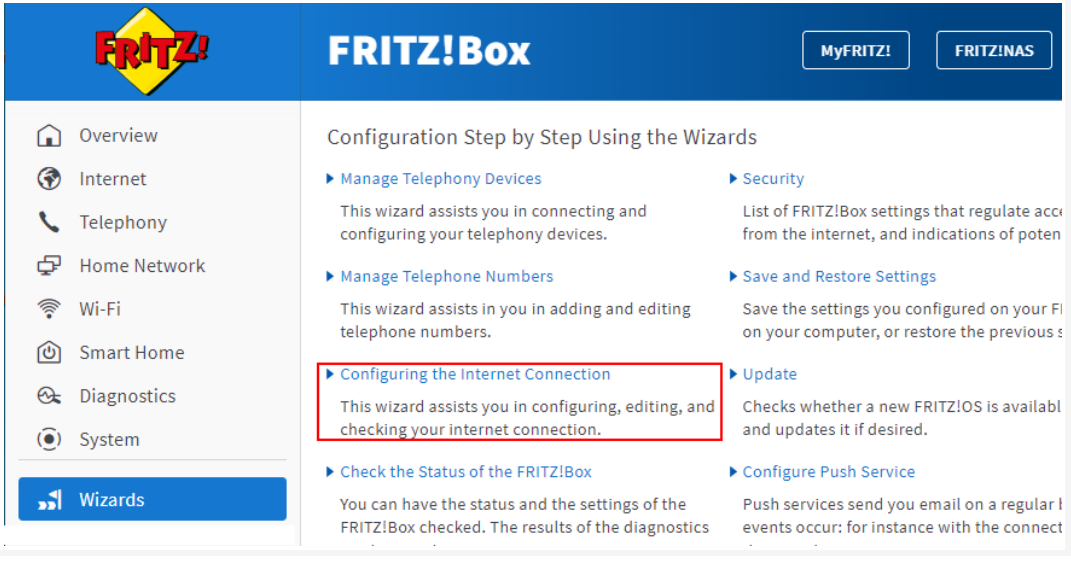
- At the Internet Connection screen, Select Other internet service provider in the ISP List.
Click Next and ensure Automatic IP/IPoE/Dynamic/DHCP is selected on Connection Type.
Save your settings by clicking on the Apply button.
Click the WiFi menu on the left, then click WiFi Network. Change the WiFi name and password to your desired values, then click Apply to save your changes.
Connect to your new Wifi network
On your mobile device, connect to the new WiFi network you created in the previous step. You should now be connected to the internet through your Fritzbox 7530 router.
Connect wired devices to your Fritzbox 7530 router
You can connect wired devices to your Fritzbox 7530 router using the LAN ports on the back of the router. Use an Ethernet cable to connect your device to one of the LAN ports on the router. Your device should now be connected to the internet through your Fritzbox 7530 router.